What did we actually run?
We ran the official Qwen/Qwen3-0.6B checkpoint at revision c1899de289a04d12100db370d81485cdf75e47ca on a Windows laptop with an NVIDIA GeForce RTX 4050 Laptop GPU. PyTorch reported 6,140.5 MiB total device memory. The installed stack was Python 3.11.9, PyTorch 2.9.0+cu128, CUDA runtime 12.8 and Transformers 5.6.2. The model was loaded in float16 with the SDPA attention implementation, entirely onto CUDA. Remote Python model code was disabled. No quantization, CPU offload, Ollama or serving queue was used.
Measured results: input length changes the footprint
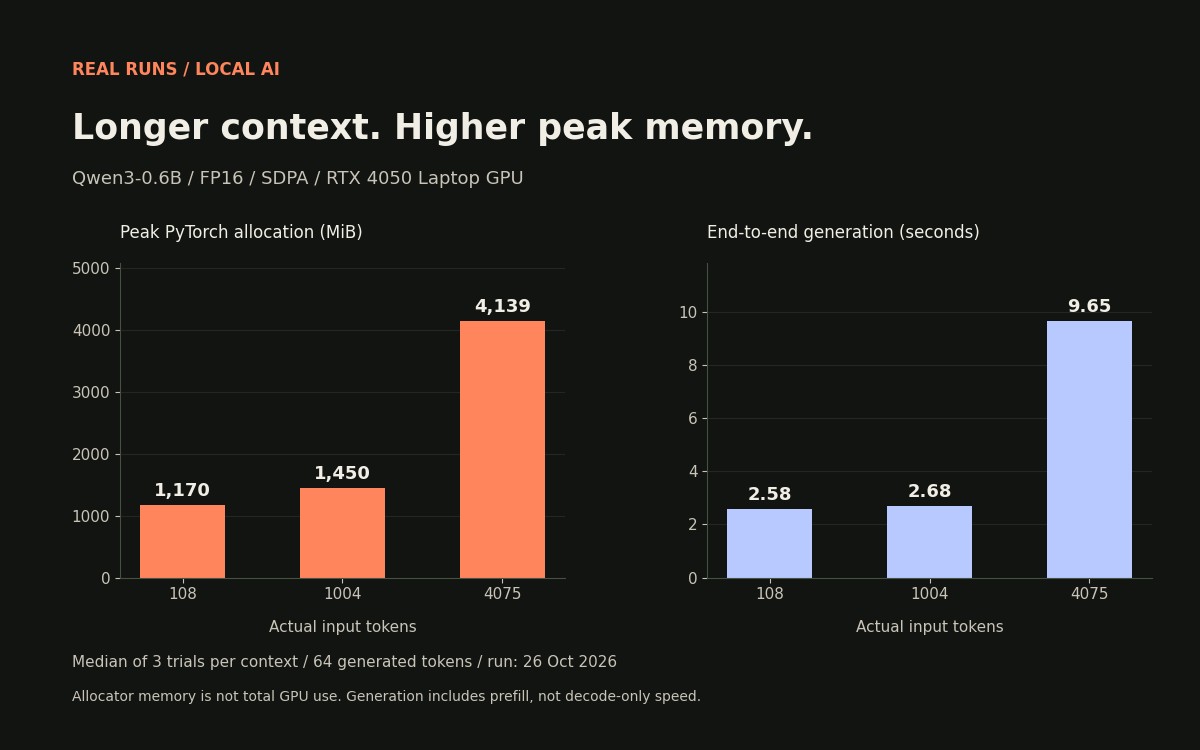
The table reports medians of three timed trials for each actual input length. Every measured run produced 64 output tokens. Target sizes were 128, 1,024 and 4,096 tokens; tokenization and chat formatting produced the actual lengths shown below. Use those actual lengths when interpreting or repeating this experiment. Memory values are peak PyTorch allocator allocation, not total GPU or operating-system usage.
| Actual input tokens | Output tokens | Median generation, s | Peak allocation, MiB | End-to-end output tokens/s |
|---|---|---|---|---|
| 108 | 64 | 2.581 | 1,170.4 | 24.80 |
| 1004 | 64 | 2.675 | 1,450.0 | 23.92 |
| 4075 | 64 | 9.645 | 4,138.7 | 6.63 |
Why this is not a pure decode-speed benchmark
Each timed interval starts immediately before generate and ends after CUDA synchronization. It includes prompt processing and autoregressive output generation, while excluding model download, model load and tokenization. Dividing 64 output tokens by this complete interval gives an end-to-end rate; it does not isolate decode throughput or time to first token. The longer prompt therefore performs more work before output generation begins. We did not isolate which kernel or intermediate buffer caused each part of the allocation increase.
Repeat the experiment and inspect every trial
Download the experiment script and raw results. In an environment with compatible PyTorch, Transformers, safetensors, requests and a CUDA GPU, run python qwen-memory-check.py --cache ./qwen-model-cache --output ./my-qwen-result.json. The first run downloads roughly 1.5 GB of official pinned model data into your chosen cache. The script does not download remote Python code and makes no inference API calls. Model weights are not bundled with this article. The raw JSON contains file hashes, software versions, complete prompts, all nine outputs, timing and allocated/reserved memory for each trial. A rerun may differ.
- Verify the model revision and every downloaded-file hash against the recorded JSON.
- Record your own GPU, software versions, power state and concurrent workloads.
- Keep dtype, attention implementation, prompt and output cap identical before comparing results.
- Separate model-loading time from timed generation.
- Do not compare this end-to-end rate directly with a provider’s decode-only number.
How prompts and trials were controlled
The script used repeated neutral padding followed by the same request for a ten-item local-AI checklist. Thinking mode was disabled. Generation was greedy with do_sample=False, use_cache=True and max_new_tokens=64. Each case had one unreported warm-up followed by three measured trials; CUDA was synchronized around the timer and peak allocator statistics were reset before each trial. Outputs can end mid-sentence because of the 64-token cap. We did not score their correctness, usefulness or reasoning. This is a memory-and-latency experiment, not a model-quality evaluation.
What a 6GB laptop owner can take from this
This specific small FP16 model completed the tested contexts on this laptop. That does not establish that a larger checkpoint, image workflow, long chat or another runtime will fit. Keep a known-working short-context baseline, then change one setting at a time and record peak allocation. For a practical next step, use the RTX 4050 local setup guide, separate GGUF and safetensors compatibility, or diagnose Ollama context and slow-model behavior. The Ollama guide describes a different runtime; the measurements here do not benchmark it.
Limits, uncontrolled conditions and how to cite this
We tested one laptop, one checkpoint and one installed stack. Power mode, thermals and concurrent system activity were not controlled, and no cross-device comparison was performed. Peak allocator allocation and reservation exclude memory outside PyTorch and do not prove unused VRAM is available to another process. We did not test simultaneous users, sustained serving, quantization or maximum context. Cite this article with the run date, pinned model revision, actual input length and linked raw JSON. Preserve the distinction between measured values and conclusions; do not turn the result into a universal GPU recommendation.
Frequently asked questions
Did Qwen3-0.6B run on a 6GB RTX 4050 laptop?
Yes, in this recorded FP16/SDPA Transformers experiment, all nine measured runs completed at 108, 1,004 and 4,075 input tokens with 64 output tokens. This does not guarantee other models, machines or runtimes will fit.
How much GPU memory did the longest context allocate?
At 4,075 input tokens, median peak PyTorch allocation was 4,138.7 MiB. That is allocator memory for this process, not total GPU usage and not an Ollama measurement.
Are the reported tokens per second decode speed?
No. The rate divides 64 output tokens by synchronized end-to-end generation time, including prompt processing and decoding. Time to first token and decode-only throughput were not isolated.
Can I reproduce the numbers exactly?
The script, pinned revision, prompts, file hashes and all trials are available. Exact timings can differ with hardware, drivers, software, cooling, power and concurrent activity. Repeat the protocol and report those conditions.
Sources & further reading
Primary sources checked Nov 3, 2026. Vendor statements are attributed; editorial advice is our own.
- 1
- 2Transformers text generation API ↗Hugging Face
- 3
- 4CUDA synchronize API ↗PyTorch
Help us keep this useful. Report a factual correction →